

Nový multijob scratch
Nový multijob scratch
Zahrnuje váš výzkum desítky či stovky výpočtů nad stejným rozsáhlým datasetem, jako je například sada referenčních genomů, chemická databáze nebo textový korpus? Tato data už nemusíte pro každou jednotlivou úlohu znovu kopírovat tam a zpět.
S novým úložištěm multijob scratch vám data zůstanou k dispozici déle a mohou být sdílená mezi více úlohami. Stačí zkopírovat data do vyhrazené složky na multijob scratchi a všechny následující úlohy jej mohou po dobu týdnů, nebo dokonce měsíců, okamžitě využívat – bez nutnosti opakovaného přenosu dat.
Upozornění: Multijob scratch je dočasné úložiště, nikoliv archiv. Svou finální práci a výsledky si vždy přesuňte na běžné úložiště a po dokončení projektu své soubory ze scratche smažte. Ačkoliv se nepoužívané soubory po několika týdnech mohou smazat automaticky, včasným úklidem uvolníte cenné úložiště pro ostatní.
Vyberte si vhodnou variantu
- Multijob fast scratch (
multijob=brnonebomultijob=plzen): vysokorychlostní paralelní úložiště umístěné v Brně nebo Plzni, ideální pro datově náročné analýzy s intenzivním čtením a zápisem (I/O operacemi). Brněnské úložiště běží na systému BeeGFS, který mnozí z vás již znají; plzeňské úložiště je zcela nové. - Multijob global scratch (
multijob=global): pomalejší síťové úložiště (CephFS), které je dostupné z každého výpočetního uzlu v MetaCentru. Hodí se v případech, kdy vaše úlohy převážně čtou velké sdílené soubory nebo si předávají výsledky z jednoho kroku do druhého.
Jak začít
Na rozdíl od standardního lokálního scratche, kde vám systém vytvoří adresář automaticky při startu úlohy (definovaný proměnnou $SCRATCHDIR), si u multijob scratche vytvoříte vlastní projektový adresář ručně jednou v /scratch/multijob-{brno|plzen|global}/$USER/ a své úlohy na něj nasměrujete.
Připravené skripty pro spouštění úloh a krátkého průvodce výběrem správného scratche pro vaši práci najdete v naší dokumentaci ke scratch úložištím.
Porovnání typů scratch úložišť v MetaCentru
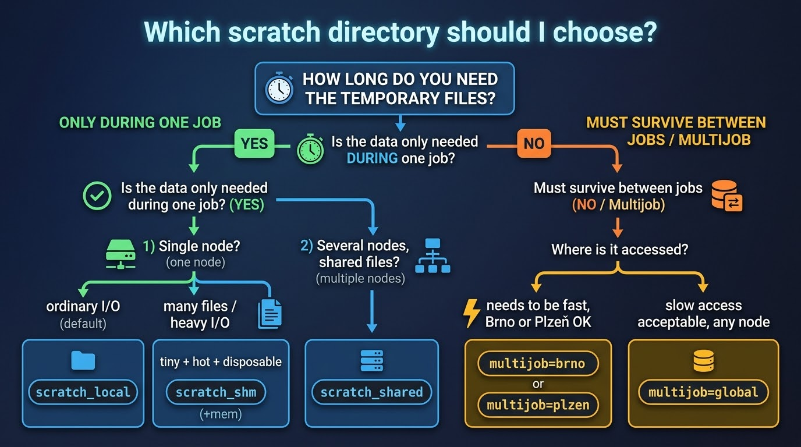
Výběr správného typu scratche je jedním z nejdůležitějších rozhodnutí ovlivňujících výkon vaší úlohy. Následující přehled vám pomůže se rozhodnout.
| Typ | PBS zdroj | Rychlost a dostupnost | Životnost | Nejvhodnější použití |
|---|---|---|---|---|
| Local scratch (výchozí volba) |
scratch_local=10gb |
Střední (na některých uzlech HDD); dostupný na každém uzlu | Jedna úloha (smazán po skončení úlohy); PBS nastaví $SCRATCHDIR automaticky |
Běžné jednouzlové úlohy se standardním objemem dat, které jednou načtou vstupy a jednou zapíšou výsledky |
| Local SSD scratch | scratch_ssd=10gb |
Rychlý (SSD); dostupný na většině uzlů | Jedna úloha (smazán po skončení úlohy); PBS nastaví $SCRATCHDIR automaticky |
I/O náročné úlohy limitované rychlostí disku: velké množství malých souborů (např. genomické nástroje), zpracování databází nebo časté ukládání mezistavů (checkpointing) |
| Scratch v RAM | scratch_shm=true(plus velké mem=) |
Extrémně rychlý (RAM, /dev/shm); dostupný všude |
Jedna úloha (okamžitá ztráta dat při pádu či zabití úlohy); PBS nastaví $SCRATCHDIR automaticky |
Malá, postradatelná mezidata vyžadující maximální rychlost. Poznámka: velikost scratche se započítává do vašeho požadavku mem=, požádejte proto o dostatek paměti pro samotný program i soubory. |
| Shared scratch | scratch_shared=10gb |
Rychlý (paralelní SSD souborový systém); dostupný na vybraných clusterech | Jedna úloha (smazán po skončení úlohy); všechny uzly úlohy vidí stejný $SCRATCHDIR |
Víceuzlové úlohy (např. MPI), ve kterých procesy na různých uzlech musí během běhu úlohy číst a zapisovat stejné soubory |
| Multijob fast scratch |
multijob=brnonebo multijob=plzen |
Rychlý (paralelní úložiště); dostupný na uzlech v Brně (bee) nebo Plzni (fobos/deimos) |
Přetrvává mezi úlohami; nepoužívané soubory se po několika týdnech mažou. Adresář si vytváříte sami: /scratch/multijob-brno/$USER/ (nebo multijob-plzen) |
Opakované využití velkého datasetu napříč mnoha úlohami (např. 500GB databáze dotazovaná 300 úlohami po dobu dvou týdnů) bez nutnosti pokaždé kopírovat data |
| Multijob global scratch |
multijob=global |
Pomalejší (síťové úložiště CephFS napříč lokalitami); dostupný na každém uzlu | Přetrvává mezi úlohami; nepoužívané soubory se po několika týdnech mažou. Adresář si vytváříte sami: /scratch/multijob-global/$USER/ |
Opakované využití dat napříč mnoha úlohami, když rychlost není kritická: sdílený stav softwaru, zřídka čtené soubory nebo předávání dat v řetězci navazujících úloh. Větší kapacita. |
Dokumentace ke scratch úložištím
Ivana Křenková, Fri Oct 16 21:40:00 CEST 2026